Changing your password
Choosing a new password of your own.
You can choose your own password at any time.
1
On the home screen tap Change Password.
2
In box 1 type the password you use now. In box 2 type your new password. In box 3 type the new password again, exactly the same. Then tap the green Change Password button (number 4).
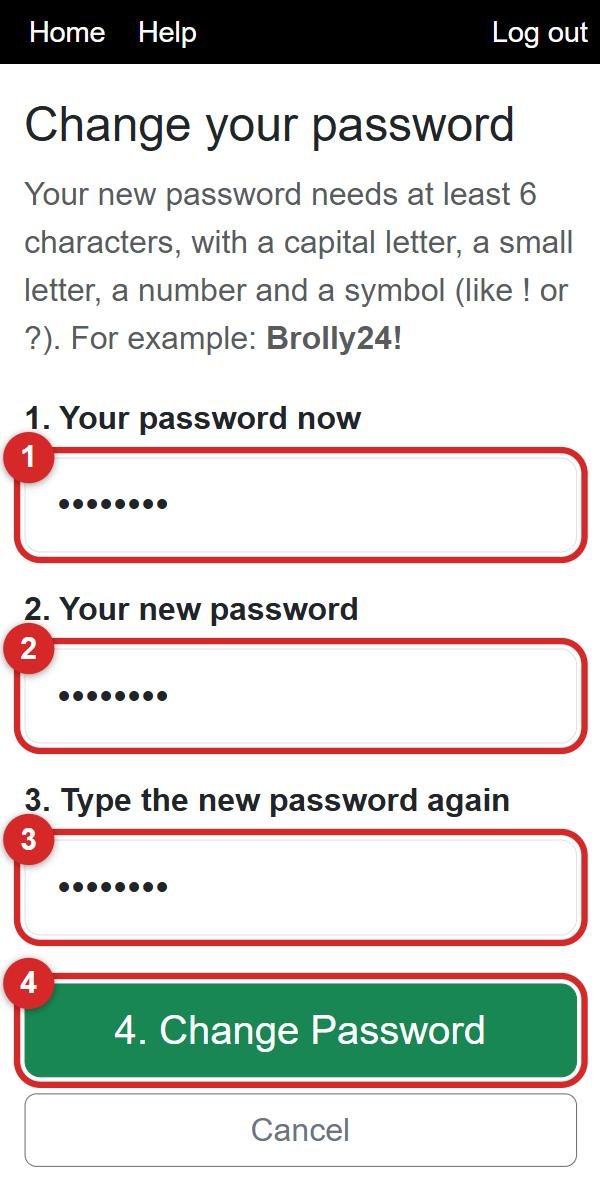
The rules for a password
At least 6 characters, and it must have:
- a capital letter (A–Z)
- a small letter (a–z)
- a number (0–9)
- a symbol, like ! or ?
For example: Brolly24! or Tea4Two?
💡 Write it down somewhere safe at home, not on the phone case!
⚠️ Forgotten your password completely? You can't change it here. Ask your manager: she can give you a new one, then you can change it to your own.