Logging in
Getting into the app with your email address and password.
You need two things: your email address and your password. Your manager will have given you both.
1
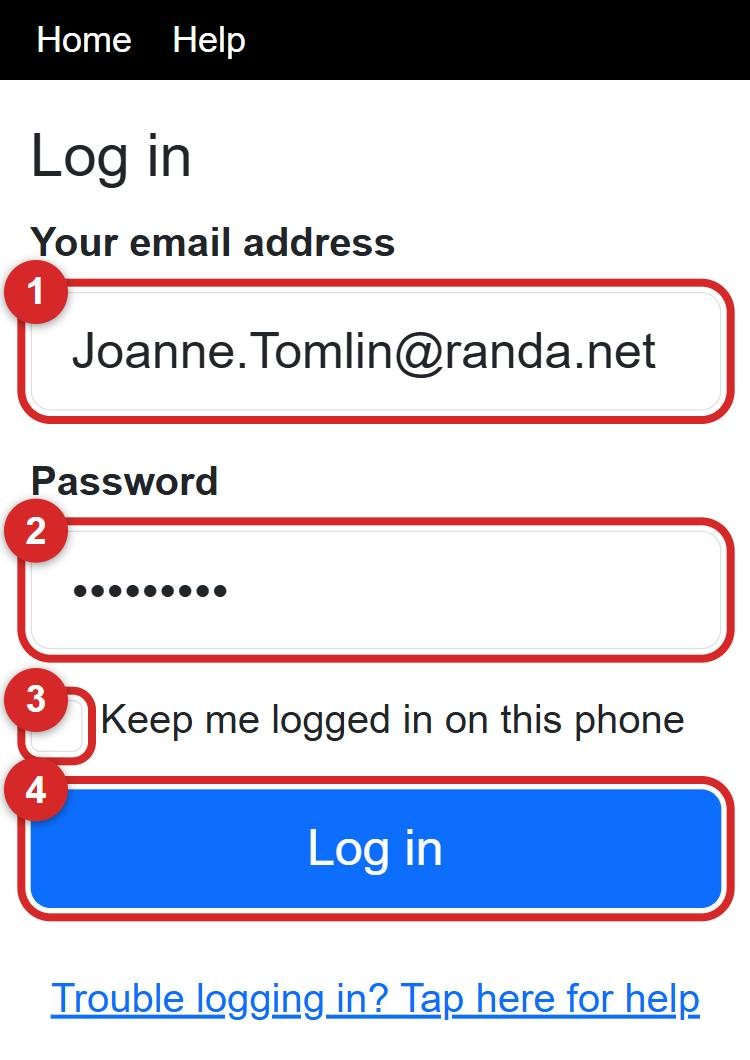
Tap in the box under Your email address (number 1 in the picture) and type your email address.
2
Tap in the Password box (number 2) and type your password. It shows as dots so nobody can read it over your shoulder.
3
If this is your own phone, tick Keep me logged in on this phone (number 3). Then you will not have to log in every time.
4
Tap the big blue Log in button (number 4).
💡 Capital letters matter in the password: Brolly24! is not the same as brolly24!. The email address does not mind about capitals.
⚠️ If it says the login is wrong, check the email address for typing mistakes, then try the password again slowly. Still no luck? Ask your manager to reset your password: she can do it in a minute.
Next: what the buttons on the home screen do.