A store or chain is missing or empty
What to do when your store isn't in the list.
Normally you only see stores that your manager has given to you. If a chain shows No stores, or your store isn't in the list, it just hasn't been given to you yet.
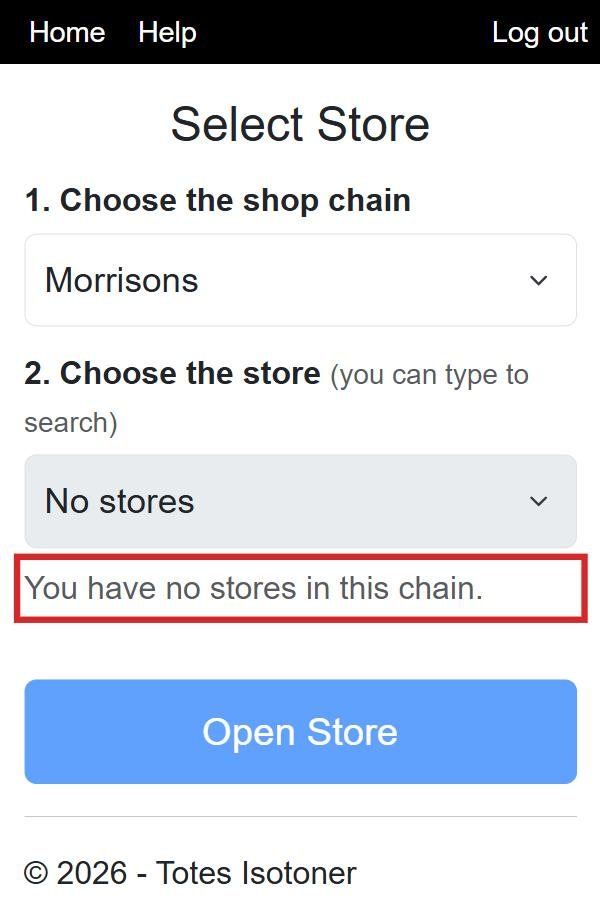
1
First check you chose the right chain, and try typing just part of the town name.
2
Need it right now? Tick Show all stores, not just mine at the bottom of the Select Store screen, then type the town or store number. Step by step, with pictures.
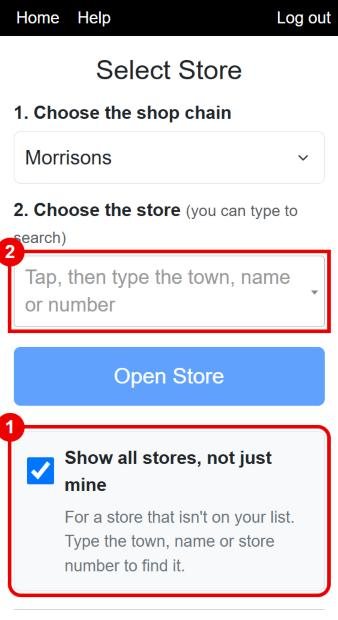
3
If it is a store you will visit regularly, send your manager a message saying which one (name, town and store number if you know it), so she can add it to your list. How to send a message.
⚠️ Still can't find it even with Show all stores ticked? It may be a new store we don't have yet. Write your notes down and message your manager: she can add the visit for you.
You might also want
- Recording a visit to a store The everyday job: pick the store, write your notes, save the visit.
- Finding your store in the list Choosing the chain, then searching for the store by name or number.